Easiest Shutdown
Shut down your PC in one click. A tray app with a glassy, animated countdown you can still cancel.
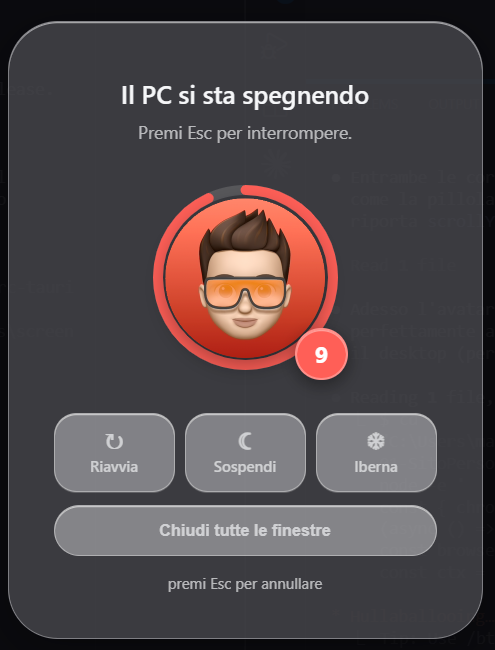
One click, then a window to change your mind
Click the tray icon — or just launch the app again — and a full-screen glass overlay appears with a 10-second countdown ring around your avatar. Click the avatar to shut down right away, or press Esc anytime to abort.
Lives in the tray
No taskbar clutter — starts hidden in the background and waits for a click.
10-second countdown
A circular progress ring drains around a custom round avatar.
Instant shutdown
Click your avatar and the PC shuts down right away, no waiting.
Cancel anytime
Press Esc and the shutdown is aborted.
Restart too
A toggle switches the countdown to reboot instead of shutting down.
Hibernate
One click to hibernate the PC instead of shutting it down.
Close all windows
Gracefully asks every open app to close, like right-click → "Close window" — no forced shutdown.
Main display
The countdown overlay opens on your primary monitor.
Liquid-glass UI
Translucent, blurred, rounded panels throughout the whole app.